Finding GitHub Copilot Harness Agents Before PPAC Shows Them
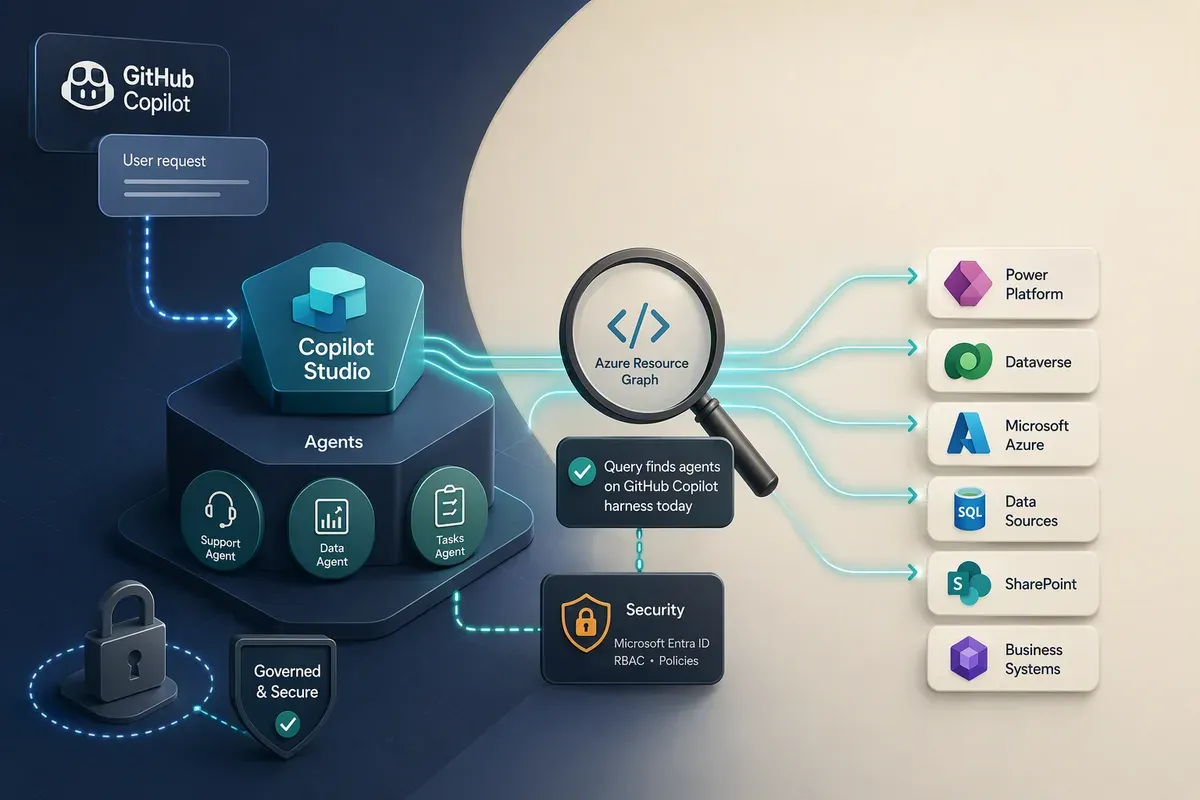
Copilot Studio picked up a new runtime recently, and you may find your users have created or are creating agents before you have a way to report on them. The Power Platform admin center inventory lists every agent you own, which is genuinely useful. It just doesn’t tell you which harness each agent runs on, and that distinction changes how the agent is billed, which AI models it can reach, and what your users are actually talking to.
I found mine with a single Azure Resource Graph query. When I first published this, the query leaned on a field I’d spotted in the response body rather than in any documentation, so it came with a stopgap warning attached. That warning has aged out. Microsoft’s Copilot Studio customer advisory team has since published governance guidance built on the same property, which turns it from a lucky find into something you can put a process behind. The query hasn’t changed. Its footing has.
What the GitHub Copilot harness actually is
A harness in Copilot Studio is the runtime between your agent design and the model. It decides when to call the model, what context to send, how to read the response, and which tools to invoke. Copilot Studio now ships three: the standard harness, the Copilot chat harness, and the GitHub Copilot harness.
The GitHub Copilot harness is the natural-language-first one. Rather than authoring topics and branching logic, you describe the agent and the system generates the configuration underneath. Microsoft shipped it as a production-ready preview in June 2026, and it’s the harness behind skills, memory, native Office file creation, and the sandboxed task execution model.
Two things matter for anyone with an admin hat on:
- You choose the harness at creation, and you can’t move an agent between them. A GitHub Copilot harness agent stays one, and a standard harness agent stays one.
- Billing works differently. Standard harness agents bill after publish. GitHub Copilot harness agents consume Copilot Credits from the moment a maker starts building. Previewing, testing, and generating evaluations all draw down credits.
Why?Why 'billing starts when you start building' changes your governance posture
Under the standard harness, an unpublished agent is a draft that costs you nothing. Under the GitHub Copilot harness, an abandoned experiment in a developer environment can still have spent credits during authoring, preview, and evaluation runs. A maker who never ships anything can still show up on your bill, which means “find the drafts” is now a cost question and not only a compliance one.
The reporting gap
Power Platform inventory does cover these agents. They land in the
PowerPlatformResources table in Azure Resource Graph under the
microsoft.copilotstudio/agents resource type, and they surface in the admin
center under Manage > Copilot Studio and the unified Manage > Inventory
page.
What’s missing is the harness. Walk the
Copilot Studio agent inventory schema
and you’ll find orchestration, model, authentication, channels,
createdIn, and a healthy set of Entra identity fields. There’s still no property
in that table that says “this agent runs on the GitHub Copilot harness,” and no
corresponding column or filter in the admin center grid. I last checked the schema
reference on 11 August 2026.
The data is in the payload anyway. Every one of my new-experience agents carries
a boolean called isCLIAgent, set to true. When this post first went up, that
was the whole story: a field in a response body with nothing behind it. Microsoft’s
Copilot Studio customer advisory team has since published
Adopting the GitHub Copilot Harness: Cost Control and Governance in Copilot Studio,
which says outright that isCLIAgent identifies agents using the GitHub Copilot
harness, and uses it in a Power Platform Inventory API request as the first step
of a credit governance process. That’s the confirmation the field was missing.
It’s still not in the schema reference table, so I’d now expect the documentation
to catch up rather than the property to vanish.
The query
Open Azure Resource Graph Explorer in the Azure portal, set the scope to your directory, and run this:
PowerPlatformResources
| where type =~ "microsoft.copilotstudio/agents"
| extend properties
| where properties.isCLIAgent == true
| project
    displayName = tostring(properties.displayName),
    environmentId = tostring(properties.environmentId),
    createdAt = todatetime(properties.createdAt),
    lastPublishedAt = todatetime(properties.lastPublishedAt),
    model = tostring(properties.model),
    ownerId = tostring(properties.ownerId),
    isCLIAgent = tostring(properties.isCLIAgent),
    id
| order by createdAt desc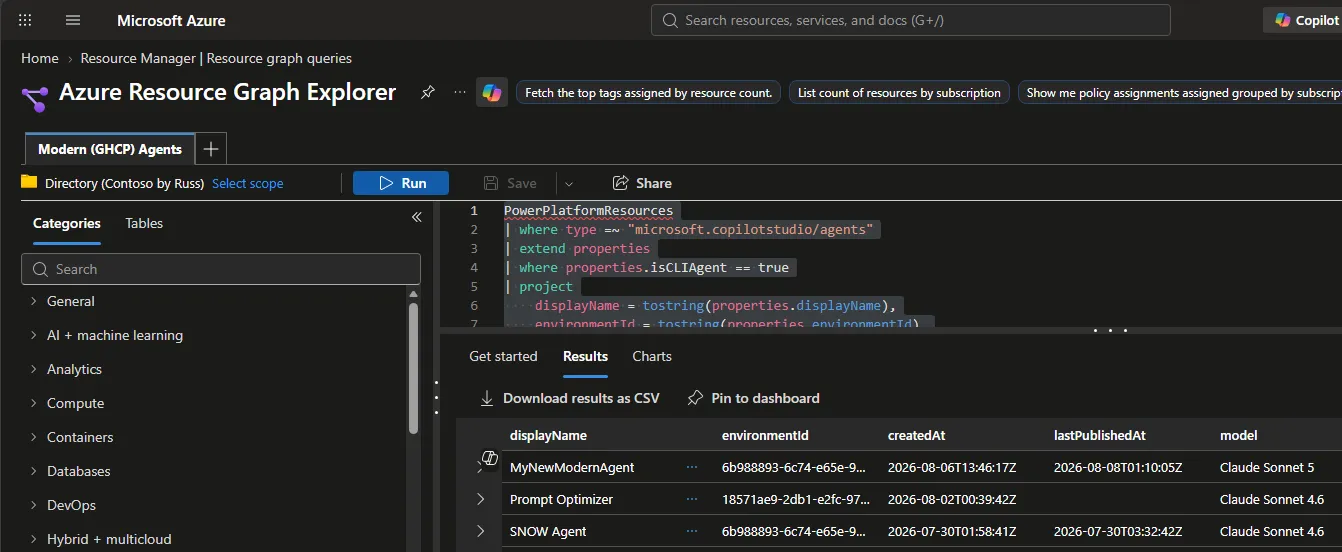
A few notes on the query itself:
- The
| extend propertiesline is a no-op.propertiesis already a dynamic column in Azure Resource Graph, so you can drop the line entirely. Microsoft’s own sample queries useextend properties = parse_json(properties)instead, which is the safer habit if you’re copying patterns between Resource Graph and other Kusto surfaces. lastPublishedAtis empty for drafts. That’s how you separate “somebody is experimenting” from “somebody shipped to users.”modelis a preview field. In my results it returned values like Claude Sonnet 5 and Claude Sonnet 4.6, which is worth a second look if you have opinions about which model providers are approved in your tenant. Access to external providers is gated by admin settings in the Power Platform admin center and the Microsoft 365 admin center, so a surprising value here is a signal to go audit those toggles.idgives you the full resource ID. Keep it. It’s the fastest way to hand a specific agent to a colleague without ambiguity.
The same question through the Inventory API
Resource Graph Explorer is fine for answering this once. When you want it on a schedule, the Power Platform Inventory API takes the same filter and hands back JSON you can feed into whatever runs your governance reviews. This is the request shape the customer advisory team uses in their post:
POST https://api.powerplatform.com/resourcequery/resources/query?api-version=2024-10-01
Content-Type: application/json

{
  "TableName": "PowerPlatformResources",
  "Clauses": [
    {
      "$type": "where",
      "FieldName": "type",
      "Operator": "==",
      "Values": ["'microsoft.copilotstudio/agents'"]
    },
    {
      "$type": "where",
      "FieldName": "properties.isCLIAgent",
      "Operator": "==",
      "Values": ["true"]
    },
    {
      "$type": "project",
      "FieldList": [
        "name",
        "properties.displayName",
        "properties.environmentId",
        "properties.ownerId"
      ]
    }
  ]
}
Same filter, reachable from a script instead of a portal tab. Swap the resource
type for microsoft.powerplatform/environments and you have the environment
sweep that belongs next to it.
What you need to run it
Resource Graph access to Power Platform inventory is gated by Microsoft Entra roles, not by the built-in Power Platform RBAC roles. Global Administrator, Power Platform Administrator, Dynamics 365 Administrator, and Global Reader see everything. AI Administrator and AI Reader are scoped to AI resources only: agents, agentic apps, agent flows, environments, and environment groups. That’s more than enough for this query and a much better fit for least privilege. If you’re standing up an agent governance function, start there rather than handing out Power Platform Administrator.
Two caveats that will bite you
The inventory reflects the published version. If a maker has unpublished changes sitting in a draft, you’re seeing the last published shape of the agent, not what they’re working on now. Changes typically appear within about 20 minutes.
V1 agents aren’t here at all. Classic bots and Power Virtual Agents don’t appear in Power Platform inventory. For those, you still go to Manage > Copilot Studio > Classic chatbots in the admin center. In practice this doesn’t overlap with harness reporting, but it does mean this table is not your complete agent estate.
Where I’d take it next
Agent counts on their own aren’t a story. Environment counts are. This joins the agents to their environments so you can see whether the new experience is landing in managed production environments or in personal developer sandboxes:
PowerPlatformResources
| where type =~ "microsoft.copilotstudio/agents"
| where properties.isCLIAgent == true
| project agentName = tostring(properties.displayName),
          environmentId = tostring(properties.environmentId)
| join kind=leftouter (
    PowerPlatformResources
    | where type =~ "microsoft.powerplatform/environments"
    | project environmentId = name,
              environmentName = tostring(properties.displayName),
              environmentType = tostring(properties.environmentType),
              isManaged = tobool(properties.isManaged)
  ) on environmentId
| summarize agents = count() by environmentName, environmentType, isManaged
| order by agents desc
I’ve run the first query against my own tenant; this second one follows the join pattern from Microsoft’s inventory API documentation, so sanity check the output against a known environment before you build a dashboard on it.
Unmanaged environments with GitHub Copilot harness agents are where I’d look first. That’s the combination where credits get spent during authoring, DLP enforcement is thinnest, and nobody has agreed on which models are acceptable.
What to do with the list
Finding the agents was always step one. The customer advisory team’s cost control and governance post covers the rest, and the part I’d act on first is the split it draws between two kinds of environment:
- Maker development. People building, previewing, and evaluating. The consumption is real, but it isn’t funded production usage. It needs a deliberate boundary and a default limit.
- Funded production usage. An approved process with a named cost owner. Same set of controls, different reasoning: the numbers should reflect expected usage and how much it hurts when the agent stops.
Inventory gives you the technical relationship between agent, owner, and environment. It won’t tell you which bucket an environment belongs in. That comes from your environment naming, environment groups, or governance metadata, and if you don’t have any of those, this query is the argument for starting them.
Environment controls
In the admin center, Licensing > Copilot Studio > Manage Copilot Credits is where you point capacity at an environment and answer four questions: how many pre-paid credits it reserves, whether it can draw unallocated capacity from the tenant pool, whether it can keep running on pay-as-you-go through an Azure subscription, and what happens as that capacity is approached or exhausted (alert, deny, or nothing).
New environments can show up with tenant-pool draw already on, which is exactly the default a sandbox shouldn’t keep. At scale, read the current state with Get Allocations By Environment and write it back with Update Allocations By Environment. That PATCH covers the whole configuration, allocated credits included, so read first and send the complete intended state rather than the one field you meant to change.
One tenant setting is worth checking before you delegate any of this. The add-on capacity assignment setting decides who can allocate credits, and switching it to environment administrators does not scope them to the environments they administer. It gives them allocation control across every environment in the tenant. Leave it with tenant admins unless that’s what you meant to do.
Agent-level limits
Licensing > Copilot Studio > Manage Agents puts a monthly credit limit on a single agent, with an optional notification as it gets close and a stop when it arrives. The API equivalent is Update Resource Threshold:
PUT https://api.powerplatform.com/licensing/environments/<environment-id>/entitlements/MCSMessages/resources/<agent-resource-id>/threshold?api-version=2024-10-01
Content-Type: application/json

{
  "stopResource": false,
  "limit": 1000,
  "stopIfOverCapacity": true,
  "notifyIfOverCapacity": true,
  "notificationThreshold": 80
}
Read stopResource carefully before you send that. It is not “stop at the
limit,” which is stopIfOverCapacity. Setting it to true stops the agent the
moment the request lands, the same as the stop action in Manage Agents.
Getting those two confused across a scripted rollout would be a bad afternoon.
Three things about limits changed how I’d plan them:
- They apply per agent, not per maker. One person with ten experiments gets ten times your default. Set the number knowing it multiplies, and decide how someone asks for more before they need to.
- The built-in notifications go to tenant and environment administrators, not to the agent owner. Decide who reads those alerts and who picks up the phone. Otherwise the first person to notice is whoever was using the agent when it stopped.
- They don’t cap an environment in aggregate. Ten agents at 1,000 credits each is a 10,000 credit environment. Microsoft has announced environment-level limits in Message Center post MC1451872 to close that gap, and they weren’t available when I wrote this. Until they land, the blunt fallback is watching consumption with Get Many Environment Entitlements and unlinking the pay-as-you-go billing policy if you need it to stop.
None of that is a one-time exercise. Environments get created, configurations drift, and a maker-development agent that graduates into a funded production process inherits a limit that was never meant for it. The environment sweep from the previous section plus a scheduled read of the current allocations is what turns this from a spreadsheet into a control.
The honest summary is better than it was. isCLIAgent started out as a field I
found in a response body and used because the alternative was not reporting at
all. It’s now the property Microsoft’s own guidance points at for this exact
question. It still isn’t in the schema reference table, so keep half an eye on
that page and move to whatever lands there. You no longer have to run this query
with your fingers crossed.
Run it. If it comes back longer than you expected, start with the unmanaged environments, put a default limit on the agents you find there, and classify the rest once you know what you’re dealing with.
Get the latest learnings
Occasional notes on Azure, AI, and cloud architecture. No spam, unsubscribe anytime.
Related articles
Power Apps Code Apps: Your Code, Power Platform's Guardrails
Code apps let you build a React or Vue app in your own IDE and run it on Power Platform, with Entra ID sign-in, 1,400+ connectors, and DLP handled for you.
Microsoft Foundry Canvas: A Visual Front End for Agent Code
Foundry Canvas puts model selection, toolboxes, guardrails, testing, and deployment in a Copilot side panel while leaving you the actual agent code.
Publish Foundry Agents to Teams Behind a Private Endpoint
Disabling public network access removes the Foundry portal's Teams publish button. Here's the REST path that replaces it and the inbound design you now own.
Comments
Comments are hosted by GitHub Discussions. Loading them connects your browser to giscus.app and GitHub.