Microsoft Foundry Canvas: A Visual Front End for Agent Code
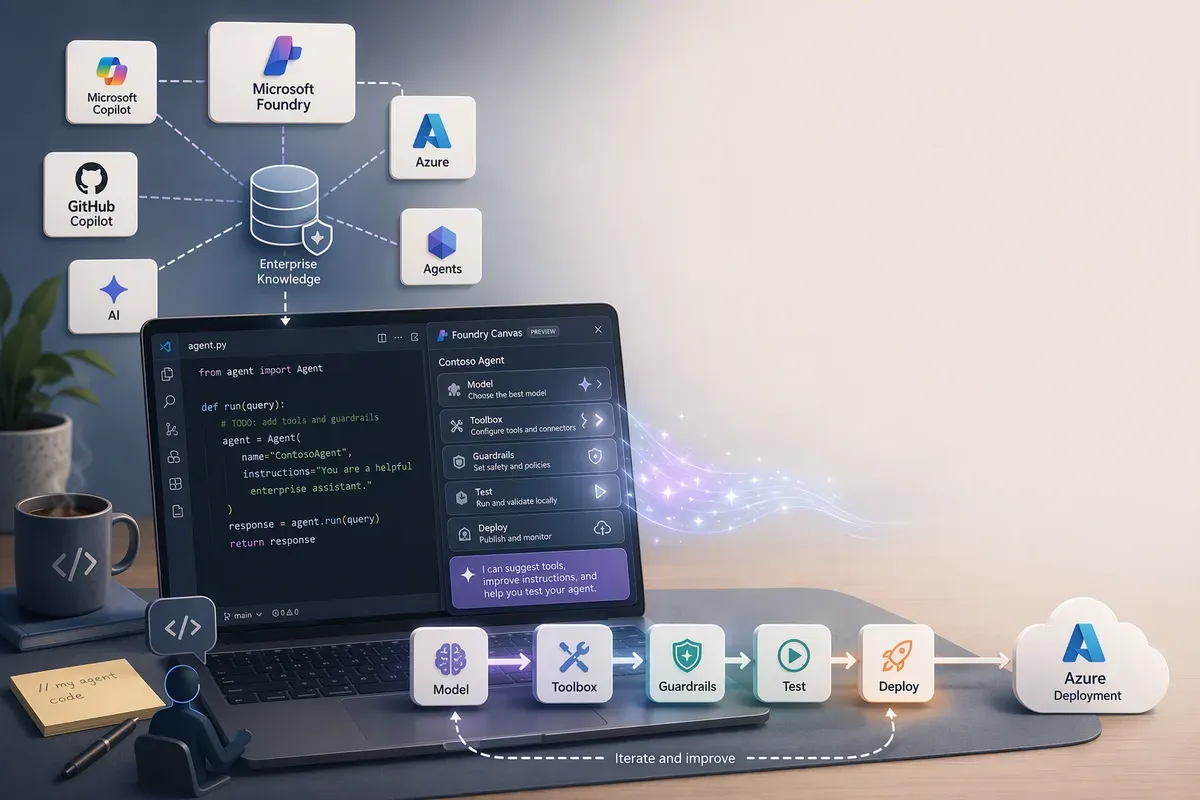
There are two ways to build an agent on Microsoft Foundry, and until recently they didn’t talk to each other.
The portal path is fast. Pick a model, attach tools, click through a form, and you have a prompt agent running in minutes. The code path gives you real control: Agent Framework or LangGraph or the OpenAI Agents SDK, your own orchestration, your own repo, packaged and run as a hosted agent. But it starts from a blank directory, and the first hour goes to boilerplate, resource IDs, and figuring out which model deployment name you actually meant.
Microsoft Foundry Canvas closes that gap. It’s a GitHub Copilot App extension that opens a side panel next to your Copilot conversation, shows you what’s actually in your Foundry project, and turns every choice you make into a prompt that Copilot runs against your workspace. You get the guided experience of the portal and the code stays yours.
Verified against Microsoft Learn on 2026-08-11. The canvas is in public preview, so check the docs before you build a process around it.
What it actually is
The Foundry canvas isn’t a designer that generates an opaque artifact. It’s a resource browser wired to a prompt bus.
When you ask Copilot to create a Foundry hosted agent, the canvas opens in the right panel and connects to Foundry. From there it does two jobs. It enumerates what exists in your project, meaning your deployed models, your Foundry Toolboxes and their tools, your skills, your guardrails. And when you select one of those things, it composes a prompt with the subscription, project, and endpoint already attached and drops it into your current Copilot session.
Copilot then does the file edits and runs the commands. The canvas never writes code directly.
That split is the whole design, and it’s the part worth understanding before you decide whether you care. Every visual tool that generates code eventually forces a choice: keep using the tool, or take ownership of the output and lose it. Because the canvas works by handing Copilot a well-formed prompt, there’s no generated-code boundary to defend. Copilot edits the same files you edit. You can rewrite everything it produced and the canvas still works on the next selection, because all it’s doing is filling in the parts of the prompt you’d otherwise have to look up.
Why?Why does the prompt hand-off matter so much?
The hard part of building an agent from the CLI isn’t the code, it’s the context. Which model deployment name is valid in this project? What’s the resource ID of that RAI policy? Which toolbox has the tool I want? Those answers live in the portal, and copying them into a chat session by hand is where the mistakes happen. The canvas is essentially an autocomplete for project context.
Getting it installed
The canvas ships as a plugin for the GitHub Copilot App, so that’s the first prerequisite and the one easiest to skip past: it isn’t a VS Code extension, and you won’t find it in the VS Code marketplace. If VS Code is where you want to work, that’s the separate Microsoft Foundry Toolkit, which is a different product with a different workflow.
With the app installed, the canvas itself comes from Settings >
Plugins: search for microsoft-foundry, select Install.
Check the rest of the prerequisites before you start. The azd ones in
particular fail late and look like a canvas bug when they aren’t:
- The GitHub Copilot App, with the Microsoft Foundry Canvas plugin installed.
- An Azure subscription, and the right role. For an existing Foundry project
you need
Foundry Project Managerat project scope. To create a new project you needOwnerat resource group scope. The hosted agent permissions reference has the full matrix. - Python 3.13 or later.
- Azure Developer CLI (
azd) 1.27.1 or later. The canvas shells out toazdfor testing and deployment, so an older version fails at the step where you least want it to. - The
azdFoundry extension, installed withazd ext install microsoft.foundry.
Check azd version first. On Windows, winget upgrade Microsoft.Azd gets you
current.
The three stages
The panel walks you through create, build, and deploy. Each stage maps to something concrete.
Create. Sign in to Azure, pick a subscription, pick a Foundry project. The canvas remembers that selection between sessions, which matters more than it sounds like it does when you’re switching between a dev project and a shared one.
Then you scaffold. Inspire me generates an agent idea and scaffolds a working hosted agent from it. Hello world starts you from the basic sample. A third button, Help me decide, sits between them; the docs show it in the Create stage but don’t say what it produces, so I’m not going to guess for you. Either way you go, Copilot writes real files into your workspace, not a preview.
Build. Here’s where knowing your project pays off. You wire a deployed model for the agent’s reasoning, connect Foundry Toolboxes and their tools for capabilities like calling APIs or running code, connect skills that package reusable logic, and assign guardrails for safety and content controls.
Each of those selections becomes a prompt. Copilot updates the agent code and configuration to match.
The guardrails one deserves a specific callout, because guardrails are the piece
teams skip when they’re moving fast. Under the hood a hosted agent definition has
an optional rai_config setting with a rai_policy_name field, and that field
wants the full ARM resource ID of the RAI policy, not the bare policy name:
/subscriptions/<subscription-id>/resourceGroups/<resource-group>/providers/Microsoft.CognitiveServices/accounts/<account>/raiPolicies/<policy-name>Omit rai_config entirely and the agent runs with no content safety guardrail at
all. Include it without a policy name and you get the default,
Microsoft.DefaultV2. Getting the canvas to fill in that resource ID for you
removes a real class of mistake.
One wrinkle if you go looking for rai_config in your own files and can’t find
it: azd doesn’t expose it in azure.yaml. It takes a policies list on the
azure.ai.agent service instead, with type: rai_policy and raiPolicyName set
to that same full ARM ID, and maps it to rai_config at deploy time. Since the
canvas drives azd, that’s the shape you’ll actually see in the repo.
Deploy and test. Two buttons, and both of them are azd underneath.
The local loop is the good part
Inspect Locally runs azd ai agent run in the Copilot integrated terminal,
waits for your agent to come up on port 8088, and embeds the Agent Inspector
right in the panel. You send a test prompt and watch what the agent does.
Then the part I actually like: when the inspector throws an error, you paste it into the canvas prompt area and ask Copilot to fix it. Same session, same workspace, full context on the code it just wrote. The loop from “that broke” to “try again” collapses to about two actions.
That’s the benefit that’s hard to appreciate from a feature list. Most agent debugging is slow because the error surfaces in one place, the code lives in another, and the resource configuration lives in a third. Here they’re all in the same window.
When you’re satisfied, Deploy to Foundry publishes the agent to Foundry Agent Service and gives you links to open the agent playground in the portal.
No lock-in, and you can prove it
Because Inspect Locally and Deploy to Foundry run azd commands, you can
drop back to the terminal at any point and keep going. That’s not a marketing
claim about openness, it’s a structural property: the canvas is a UI over a CLI
you already have installed, operating on files in a repo you already control.
Practically, that means the canvas is safe to hand to someone learning Foundry.
They get help avoiding the usual mistakes, and what they end up with is a normal
azd workspace that a more experienced engineer can review, fork, or run in a
pipeline. Nothing about the artifact says “built with a visual tool.”
What to check before you rely on it
It’s public preview. No SLA, not recommended for production workloads, and features can change or be constrained. Plan accordingly.
A few specifics worth knowing up front:
- Windows ARM64 local runs can fail to build. Prebuilt arm64 wheels aren’t
published for
aiohttp,grpcio,cryptography, orhttptools, and source builds need Microsoft C++ Build Tools. The documented workaround is to skip local testing and validate remotely withazd deployfollowed byazd ai agent invoke. - Port
8088has to be free. AConnection refusedon local run is almost always another process sitting on it. - Egress guardrail header transforms only take static values during preview. A
rule that uses a dynamic
valueRefto inject a managed identity token or a secret is accepted, but the header isn’t injected at runtime. Don’t design around it yet. Worth knowing alongside that: Audit mode only softensDenyactions, so header transforms and rewrites still take effect while you think you’re just observing. azd downis sharper than it looks. If the currentazdenvironment created the Foundry project,azd downpermanently deletes the project’s resource group and everything in it. If you selected an existing project during init, it leaves the project and its resources alone and you clean up the leftovers yourself. Know which situation you’re in before you run it.
Where I’d use it
If you’ve never built a hosted agent, start here. The canvas answers the questions that otherwise cost you an afternoon, and you finish with working code rather than a portal configuration you can’t diff.
If you build agents regularly, the value is narrower but still real: it’s the fastest way to spin up a scratch agent against a project you don’t have memorized, and the local inspect-and-fix loop beats tabbing between a terminal, the portal, and your editor.
What I’d still want before putting it in a team workflow is a clearer story on
how canvas-scaffolded projects behave in CI. The azd workspace suggests they
behave fine, but I haven’t run one through a pipeline yet, so I’m not going to
tell you it works.
If you want to try it, the canvas quickstart walks the whole path end to end, and the concept doc covers what the panel exposes. If you’ve deployed something real from it, tell me what broke. That’s the part the docs never cover. ;)
Get the latest learnings
Occasional notes on Azure, AI, and cloud architecture. No spam, unsubscribe anytime.
Related articles
Coding with AI: A Neurodivergent Non-Coder's Guide to Building Real Apps
Field-tested lessons from shipping with AI: use plan mode, build reusable skills, choose models deliberately, and keep a reviewer in the loop.
Finding GitHub Copilot Harness Agents Before PPAC Shows Them
The Power Platform admin center still doesn't flag which Copilot Studio agents run on the GitHub Copilot harness. The isCLIAgent property does, and Microsoft has now published governance guidance built on it.
Customizing GitHub Copilot: A Quickstart for the Best Experience
A 20-minute quickstart for customizing the GitHub Copilot app as a non-coder: instructions, agent skills, MCP servers, custom agents, and plugins.
Comments
Comments are hosted by GitHub Discussions. Loading them connects your browser to giscus.app and GitHub.