Power Apps Code Apps: Your Code, Power Platform's Guardrails
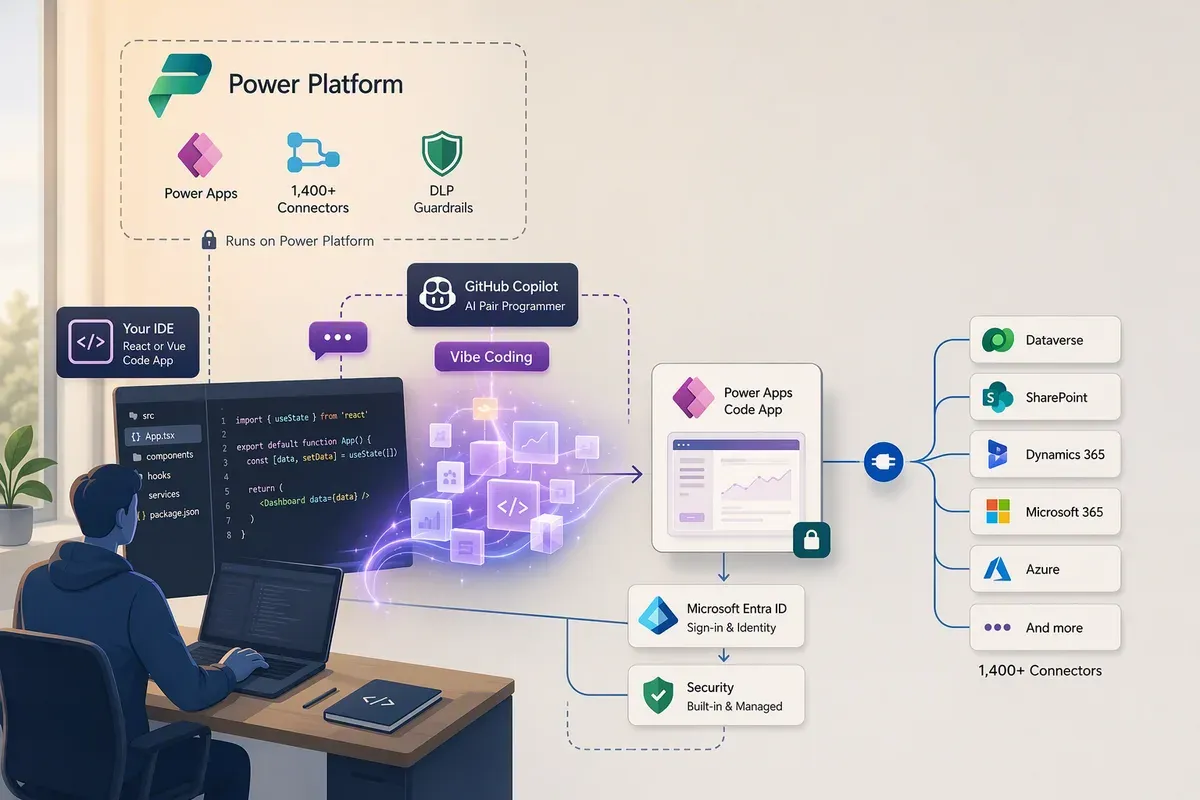
Every time I’ve wanted to build an internal app, I’ve hit the same fork in the road. Go canvas, and I get sign-in, connectors, and governance for free, but I’m living inside a designer and a formula bar. Go build a real web app, and I get full control of the UI, but now I own authentication, hosting, secrets, and the conversation with security about all three.
Power Apps code apps collapse that fork. You build a normal web app in your own editor, with React or Vue or whatever you already use, and then push it to Power Platform, which hosts it and handles the identity and governance layer. Your code stays yours. The plumbing stops being your problem.
Code apps went generally available in February 2026, so this isn’t a preview you’re gambling on anymore.
Verified against Microsoft Learn on 2026-08-11.
What a code app actually is
A code app is a A web app that loads once and then updates the page in the browser instead of requesting a new page from the server for every click. that you write, build, and run locally, and that Power Platform then hosts and governs.
Three pieces make that work:
- Your app. Any HTML or TypeScript/JavaScript single-page app. Power Apps doesn’t generate it and doesn’t own it.
- The Power Apps client library (
@microsoft/power-appson The public registry where JavaScript packages are published, and the command-line tool that installs them into your project.). This is what gives your code typed access to Power Platform connectors, and it keeps apower.config.jsonfile describing which connections your app uses. - The Power Apps host. The runtime your published app loads inside. It handles end-user authentication, app loading, and the error messaging when something goes wrong.
That third piece is the one that earns its keep. You never write a sign-in flow, never register an app for OAuth, never manage a token cache. The host authenticates the user with Microsoft Entra ID before your code runs.
See it running
I recorded a walkthrough of two apps I built to test how far this goes in practice. It’s the fastest way to see what the local-to-published loop actually feels like.
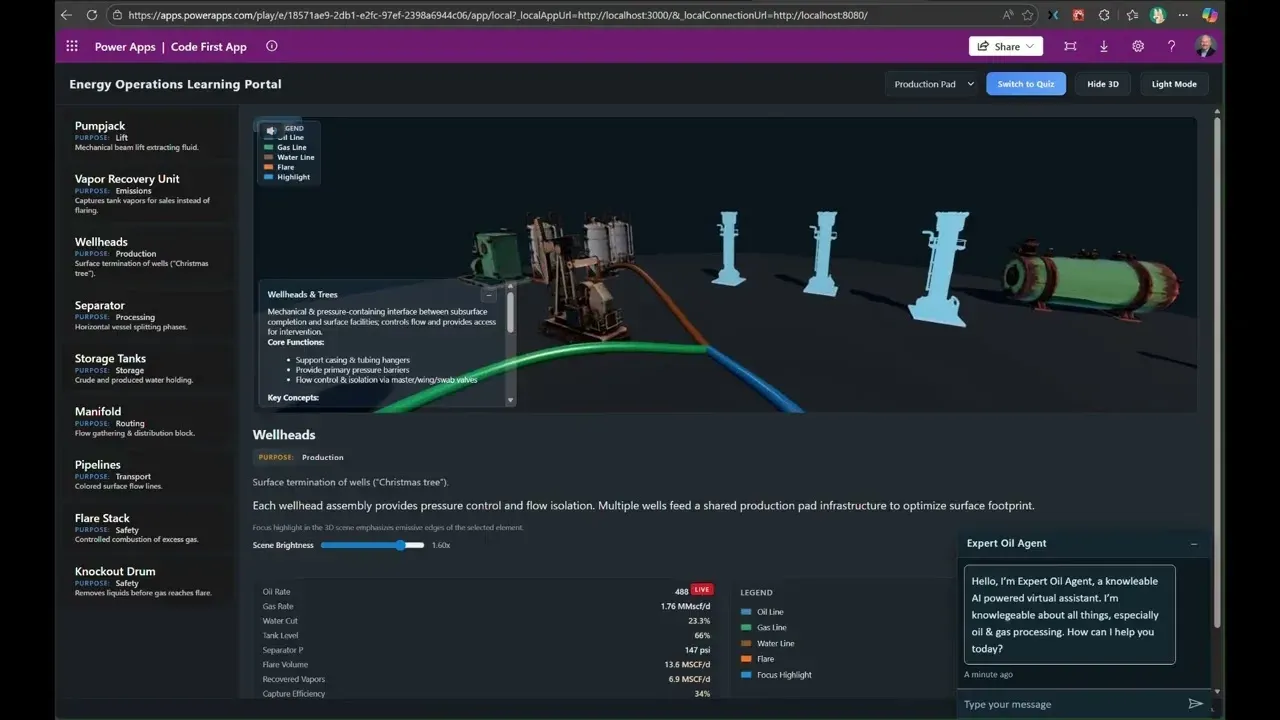
Power Apps Code Apps on YouTube. Two apps I built to put code apps through their paces.
What you need before you start
Four things, and the third one is where most people get stuck.
- Local tooling. Node.js (the LTS release), Git, and an editor. I use Visual Studio Code.
- The CLI. More on which one in a moment.
- Code apps enabled on the environment. This is an admin toggle, not a maker setting. In the Power Platform admin center, go to Manage > Environments, pick your environment, then Settings > Product > Features, and turn on Enable code apps. If you manage a lot of environments, you can set it across many at once with environment groups and rules.
- Licensing. Every end user who runs a code app needs a Power Apps Premium license. Worth settling before you build something twelve people are waiting on.
Why?Why is the environment toggle off by default?
Code apps ship compiled assets to a Power Platform-hosted endpoint and can call any connector your policies allow. Making it an explicit environment opt-in means an admin decides where this capability exists, rather than it appearing in every sandbox in the tenant on release day. If you’re evaluating, turn it on in a dev environment first and leave production alone.
pac or pa? Read this before you copy a tutorial
There are two command-line tools in play here, their names differ by one letter, and Microsoft is in the middle of switching between them. This is the single most confusing thing about getting started, so it’s worth thirty seconds.
pac is the Power Platform CLI. It’s the long-standing tool that does
solutions, environments, auth profiles, and much more. Code apps live under a
subcommand: pac code init, pac code push, pac code add-data-source. Note
that it’s pac code, never pac app.
pa is the Power Apps CLI. It’s the newer npm package
@microsoft/power-apps-cli, and it only does code apps. Commands are grouped as
pa app, pa auth, pa connection, pa connector, and pa telemetry, so the
build commands read pa app init, pa app run, pa app push.
Learn says the npm CLI replaces pac code, and that the pac code commands will
be deprecated in a future release. So if you’re starting today, start on pa.
If you hit a tutorial using pac code push, it still works, it just isn’t where
this is heading. The rest of this post uses pa.
Why?Why did the CLI change at all?
The pac CLI is a .NET tool, which meant standing up a dotnet install just to
publish a JavaScript app. The npm CLI drops that: if you already have Node.js
for your app, you already have everything you need to install the CLI. Fewer
prerequisites, and the tool now lives in the same package ecosystem as the app
it publishes.
The build loop
Here’s the whole cycle with the npm CLI. It’s shorter than I expected the first time.
Create a project from the Vite template and install what it needs:
npx degit github:microsoft/PowerAppsCodeApps/templates/vite my-app
cd my-app
npm install --global @microsoft/power-apps-cli
npm install --global @microsoft/power-apps
npm install
Point the project at a Power Platform environment:
pa app init --display-name "My Code App" --environment-id <environment-id>Run it locally:
pa app runOpen the URL labeled Local Play, and use the same browser profile you’re signed into your tenant with. That detail matters more than it sounds like it should, because the local app is authenticating against your real environment.
When it’s ready to share:
npm run build
pa app push
That returns a Power Apps URL. From there it’s an app in your environment like any other: share it, quarantine it, monitor it.
Connectors are where it stops being just hosting
Your JavaScript can call the Power Platform connector catalog directly, and that’s what separates this from renting a container somewhere.
Microsoft counts more than 1,400 connectors, and code apps support all of them except Excel Online (Business) and Excel Online (OneDrive).
You add a data source from the CLI, using the connector identifier and a connection ID:
pa app add data-source --connector "shared_office365users" --connection-id "aaaaaaaa000011112222bbbbbbbbbbbb"Adding it generates typed TypeScript files for you, a model and a service. An
Office 365 Users data source produces Office365UsersModel.ts and
Office365UsersService.ts, and from there you’re just calling methods:
import { Office365UsersService } from "./generated/services/Office365UsersService";

const profile = (await Office365UsersService.MyProfile_V2("id,displayName,jobTitle")).data;
Tabular sources like SQL and SharePoint work the same way, adding --dataset and
--table, and you get getall, get, create, update, and delete on the
generated service. If you don’t know those values yet, pa connection list-datasets and pa connection list-tables will tell you, which beats digging
through browser dev tools.
When the schema behind a connection changes, regenerate the typed files with
pa app refresh data-source --name <data-source-name>. Older guidance says to
delete and re-add the data source, and you still can with pa app remove data-source, but the refresh command is the shorter path.
For anything you plan to move between dev, test, and production, bind to a connection reference instead of a specific user’s connection:
pa app add data-source --connector "shared_sql" --connection-ref "<logical-name>" --solution-id "<solution-id>"That’s the difference between a solution that deploys cleanly and one you rewire
by hand in every environment. Use pa connection list-references --solution-id
to find the logical name.
What your security team gets out of it
This is the argument that actually wins the meeting, so it’s worth being specific. A published code app is a governed Power Platform asset, which means these apply without you writing a line of code:
- Microsoft Entra ID authentication, with no custom auth flow to build or review
- Data loss prevention policy enforcement at app launch
- Conditional Access, including policies scoped to an individual app
- Canvas app sharing limits, app quarantine, and tenant isolation
- Connector consent dialogs, with admin consent suppression where you’ve configured it
- Health metrics in both the admin center and the maker portal
- Microsoft Entra B2B for external users, the same as canvas apps
Compare that to the version of this app you’d host yourself, and the list of things you no longer have to design, document, and defend is long.
What it doesn’t do yet
Being honest about the edges saves you a bad week later.
- No Power Platform Git integration. Your source lives in your own repo, which is fine, but the platform’s Git integration doesn’t cover code apps.
- No IP-based restriction. Compiled app assets are served from a publicly accessible endpoint, so the SAS IP binding and firewall environment setting doesn’t apply. To restrict by location, use a Conditional Access block-by-location policy instead. That’s a real control, just a different one than you might expect.
- Not supported in Power Apps for Windows.
- No Power BI data integration. The
PowerBIIntegrationfunction isn’t supported, though you can embed a code app in a Power BI report using the Power Apps visual. - No SharePoint form integration.
When I’d reach for this
If the app is a form over data and a handful of screens, a canvas app is still less work and I’d build it there.
I’d reach for a code app when the interface is the point: a dashboard with real charts, a workflow with genuine state, anything where I’d otherwise spend the project fighting a designer to get the layout I already have in my head. And especially when the alternative is standing up my own hosting and owning auth, because that’s the tradeoff code apps actually eliminate.
Start in a dev environment with the toggle on, run the Vite template end to end, and push something small. The loop is short enough that you’ll know within an afternoon whether it fits your problem.
Then go browse the samples and starter templates in Microsoft’s repo, and watch the demo video if you want to see two of these running before you build your own.
Get the latest learnings
Occasional notes on Azure, AI, and cloud architecture. No spam, unsubscribe anytime.
Related articles
Finding GitHub Copilot Harness Agents Before PPAC Shows Them
The Power Platform admin center still doesn't flag which Copilot Studio agents run on the GitHub Copilot harness. The isCLIAgent property does, and Microsoft has now published governance guidance built on it.
Customizing GitHub Copilot: A Quickstart for the Best Experience
A 20-minute quickstart for customizing the GitHub Copilot app as a non-coder: instructions, agent skills, MCP servers, custom agents, and plugins.
Add ServiceNow to Copilot Studio with User Login SSO (So ServiceNow Permissions Are Respected)
Connect ServiceNow to Copilot Studio with Microsoft Entra ID User Login so requests honor each user's roles, ACLs, and audit trail.
Comments
Comments are hosted by GitHub Discussions. Loading them connects your browser to giscus.app and GitHub.